×

Scenario 3
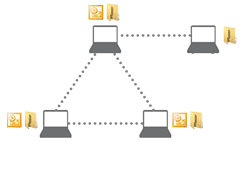
4 PCs: 3 PCs with SYNCING.NET Business Edition (or up to 3 PCs with Personal Edition) and a 4th PC with FileSharing Edition.
How can I include the 4th computer with FileSharing Edition for document exchange without exceeding edition or Outlook Group limits?
- Sign in with a separate e-mail address (user account) on the 4th PC running the FileSharing Edition.
- From the computer with the latest files, invite the 4th PC's user account only to your shared Sync Folders (document folders).
Note: If you sign in with the same primary user account on the 4th PC, it will automatically receive invitations to all existing Outlook Groups as well. Because the FileSharing Edition is designed for file synchronization only (and Personal Edition supports a maximum of 3 PCs), using a separate account for the 4th PC ensures clean file sharing without license limit conflicts.
Didn't find the answer you were looking for?
Return to the FAQ overview or submit a ticket to our technical team.
