×

Scenario 1
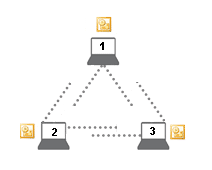
3 PCs, where each computer has visibility of the calendar of all the other PCs.
Each computer requires the SYNCING.NET Business Edition.
- Sign in with the same e-mail address (user account) on all computers.
- Create an Outlook Group on each computer for its respective calendar.
- When importing on the other computers, select the option to import into new Outlook folders.
- On each PC, a separate Calendar folder will be created upon successful import.
Didn't find the answer you were looking for?
Return to the FAQ overview or submit a ticket to our technical team.
